编程经验分享

笑看嫣红染半山,
逐风万里白云间,
逍遥此身不为客,
天地三才任平凡。

0%

Python is a powerful programming language.

It is very friendly and easy to learn.

At writing time of this article Python 3.7.2 latest stable version is available to download and install.

This tutorial will help you to install Python 3.7.2 on your CentOS 7 operating systems.

Step 1 – Requirements

This Python installation required GCC compiler on your system. Login to your server using ssh or shell access. Now, use the following command to install prerequisites for Python before installing it.

1
root@localhost # yum install gcc openssl-devel bzip2-devel

Read: How to Use SSH to Connect Remote Linux Server

阅读全文 »

The CentOS 7’s support for Nvidia video graphic cards comes in a form of an open source nouveaudriver. In case the nouveau driver is not a sufficient solution, users can install the official Nvidia driver as a proprietary alternative. This step by steps tutorial will guide you through the entire process on Nvidia driver installation.

阅读全文 »

情况说明

原本安装了 UbuntuWindows 10 双系统,通过 UEFI 启动,并使用 GRUB 来引导。
然后,我要把Ubuntu换成CentOS 7,覆盖Ubuntu的分区安装了 CentOS 7
结果装完一启动,发现 Windows 10 不见了……
后来想了想,应该是在分区的时候把原本的 EFI 系统分区删了,导致新的 EFI分区里没有 Windows 记录的原因。
于是就开始了漫长的修复过程。

阅读全文 »

一次逆向网页内容加密

以往爬取网页内容复杂点的,一般就是处理下页面内容动态载入,动态载入的内容可能会要求复杂奇怪的参数,或者找到这个动态载入的HTTP接口在哪里麻烦点。但是这次要爬去的网页不同。

类似如下内容:

1
2
3
4
5
6
7
8
9
10
11
12
13
14
<td class="omission" width="20%">
<span name="record:shenqingrxm" title="pos||">
<span id="23c0b75102b6428aa7b476376500874b" class="nlkfqirnlfjerldfgzxcyiuro">江苏</span>
<span id="0e6878027a6a4ccf8d65611a2fb27531" class="nlkfqirnlfjerldfgzxcyiuro">先思</span>
<span id="a3aeb4224cf4427e8bd9835a8b7d97a1" class="nlkfqirnlfjerldfgzxcyiuro">江苏</span>
<span id="1493721d631c4151bc06c6ff22d14cd2" class="nlkfqirnlfjerldfgzxcyiuro">先思</span>
<span id="7281a4fc0de04a41ac0a7aaf99313d88" class="nlkfqirnlfjerldfgzxcyiuro">江苏</span>
<span id="f8e5b5fe489f44cfbcbc8f65537cf43a" class="nlkfqirnlfjerldfgzxcyiuro">先思</span>
<span id="5f330b68a24a4e1282fcde2b78a26df3" class="nlkfqirnlfjerldfgzxcyiuro">达生</span>
<span id="fe91da602e864b7f833e2712db254ee5" class="nlkfqirnlfjerldfgzxcyiuro">物科</span>
<span id="dead9499be73496fa689123b9656422c" class="nlkfqirnlfjerldfgzxcyiuro">技有</span>
<span id="eee677751a2d4613bdb89df9ce9f3e23" class="nlkfqirnlfjerldfgzxcyiuro">限公司</span>
</span>
</td>

最终希望得到的内容其实是江苏先思达生物科技有限公司,但是得到的网页确实乱序后的字符串,并且每次刷新得到的乱序还不一样,试过几次也看不出规律。

阅读全文 »

理解git常用命令原理

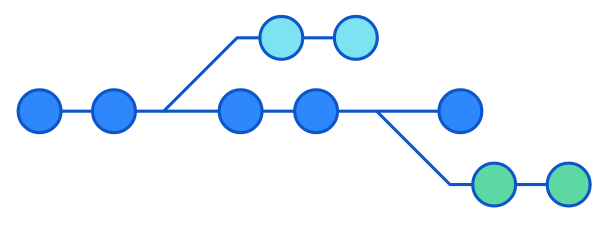
git不同于类似SVN这种版本管理系统,虽然熟悉常用的操作就可以满足大部分需求,但为了在遇到麻烦时不至于靠蛮力去尝试,了解git的原理还是很有必要。

文件

通过git管理的文件版本信息全部存放在根目录.git下,稍微看下:

1
2
3
$ ls .git
COMMIT_EDITMSG HEAD branches description index logs packed-refs
FETCH_HEAD ORIG_HEAD config hooks info objects refs

git除了提供给我们平时常用的一些命令之外,还有很多底层命令,可以用于查看以上部分文件表示的东西。

三个区域/三类对象

理解git里的三个区域概念非常重要。git里很多常用的命令都是围绕着这三个区域来做的。它们分别为:

  • working directory,也就是你所操作的那些文件
  • history,你所提交的所有记录,文件历史内容等等。git是个分布式版本管理系统,在你本地有项目的所有历史提交记录;文件历史记录;提交日志等等。
  • stage(index),暂存区域,本质上是个文件,也就是.git/index

git中还有三类常用对象(实际不止三种),理解这三类对象也很重要。分别为:

  • blob,用于表示一个文件
  • tree,用于表示一个目录,索引到若干文件或子目录
  • commit,用于表示一次提交(commit)

所有对象都会以文件的形式保存在.git/objects目录,一个对象一个文件。

阅读全文 »

Mac上多张图片生成PDF文件的方法

Just do the following

  1. Open the first image in Preview
  2. Show the the sidebar (Shift-Command-D)
  3. Drag any additional images to the sidebar
  4. Go to File > Print (Command P)
  5. In the PDF dropdown list select Save as PDF

按照如下步骤去做

  1. 预览打开第1张图片
  2. 显示边栏 (Shift-Command-D)
  3. 把剩余的图片拖拽进边栏第1张图片下面
  4. 打开菜单项:文件 > 打印 (Command P)
  5. PDF 下拉列表(弹出对话框的左下角) 选择另存为 PDFSave as PDF)

Linux文件传输断点续传

在Linux系统上传与下载文件的时候,很容易断开,或者是大文件传输,如何在断开后继续传输不用重新开始,这里我们可以用到Linux的rsync

使用说明

文件断点下载

1
rsync -P --rsh=ssh root@192.168.0.11:/root/large.tar.gz /dounine/targe.tar.gz

文件断点上传

1
rsync -P --rsh=ssh /dounine/targe.tar.gz root@192.168.0.11:/root/large.tar.gz 

文件目录断点下载

1
rsync -P --rsh=ssh -r root@192.168.0.11:/root/storage /dounine

文件目录断点上传

1
rsync -P --rsh=ssh -r  /dounine root@192.168.0.11:/root/storage

后台运行,将以上脚本放入shell文件中
cat bg.sh

1
rsync -P --rsh=ssh -r root@192.168.0.11:/root/storage /dounine &

后台运行

1
2
chmod +x bg.sh
nohup ./bg.sh

普通方式上传下载

上传文件

1
scp /dounine/targe.tar.gz root@192.168.0.11:/root/large.tar.gz 

下载文件

1
scp root@192.168.0.11:/root/large.tar.gz  /dounine/targe.tar.gz

上传目录

1
scp -r /dounine root@192.168.0.11:/root

下载目录

1
scp -r root@192.168.0.11:/root/storage /dounine

指定ssh key文件

1
rsync  -avzP --rsh="ssh -i ~/.ssh/my-ssh-key" suyanlu@192.168.0.11:/home/road_damage/RoadDamageDataset.tar.gz .

Cookie的出现

HTTP协议是无状态的,但是服务器上运行的业务要有状态。

Cookie的最初目的就是为了存储状态信息,以方便服务器端使用。

比如:如果没有状态,我们就无法在服务端判断某个用户是否是第一次访问该网站

  1. Cookie是客户端技术,程序把每个用户的数据以cookie的形式返回给用户的浏览器。当用户使用浏览器再去访问服务器中的web资源时,就会带着各自的cookie数据。这样,web资源处理的时候就可以区分用户,对应的就是不同用户的数据。
  2. cookie处理:
  • 服务器用SetCookie向客户端发送cookie
  • 浏览器保存cookie
  • 之后每次http请求浏览器都会将cookie带给服务器端
阅读全文 »

Python项目自动生成和安装requirments

在Python项目中,经常会看到一个requirements.txt文件,里面记录了当前项目的所有依赖包及其精确版本号,作用是用来在其他机器上重新构建项目所需要的运行环境依赖。

requirements.txt可以通过pip命令自动生成和安装

生成requirements.txt文件

1
$ pip freeze > requirements.txt

安装requirements.txt依赖

1
$ pip install -r requirements.txt

转自:http://www.ruanyifeng.com/blog/2018/10/git-internals.html

Git 是最流行的版本管理工具,也是程序员的必备技能之一。

即使天天使用它,很多人也未必了解它的原理。Git 为什么可以管理版本?git addgit commit这些基本命令,到底在做什么,你说得清楚吗?

这篇文章用一个实例,解释 Git 的运行过程,帮助你理解 Git 的原理。

img

一、初始化

首先,让我们创建一个项目目录,并进入该目录。

1
2
$ mkdir git-demo-project
$ cd git-demo-project

我们打算对该项目进行版本管理,第一件事就是使用git init命令,进行初始化。

1
$ git init

git init命令只做一件事,就是在项目根目录下创建一个.git子目录,用来保存版本信息。

1
2
3
4
5
6
7
8
9
10
$ ls .git

branches/
config
description
HEAD
hooks/
info/
objects/
refs/

上面命令显示,.git内部还有一些子目录,这里先不解释它们的含义。

阅读全文 »