0%
Python Argparse Introduction
1. ArgParse介绍
是python的一个命令行解析包,用于编写可读性非常好的程序
2. 基本用法
example.py是linux下测试argparse的文件,放在/home/pyworkspace目录下,其内容如下:
1 | #!/usr/bin/env python |
测试:
1 | root@centos7 /home/pyworkspace $ python example.py |
- 第一个没有任何输出和出错
- 第二个测试为打印帮助信息,
argparse会自动生成帮助文档 - 第三个测试为未定义的-v参数,会出错
- 第四个测试为未定义的参数foo,出错
A Visual Intro to NumPy and Data Representation
A Visual Intro to NumPy and Data Representation
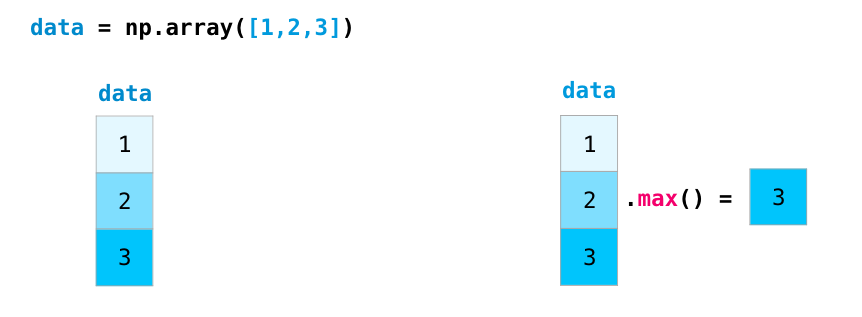
The NumPy package is the workhorse of data analysis, machine learning, and scientific computing in the python ecosystem. It vastly simplifies manipulating and crunching vectors and matrices. Some of python’s leading package rely on NumPy as a fundamental piece of their infrastructure (examples include scikit-learn, SciPy, pandas, and tensorflow). Beyond the ability to slice and dice numeric data, mastering numpy will give you an edge when dealing and debugging with advanced usecases in these libraries.
In this post, we’ll look at some of the main ways to use NumPy and how it can represent different types of data (tables, images, text…etc) before we an serve them to machine learning models.
1 | import numpy as np |
Ubuntu 18.04 LTS 更换国内源
Ubuntu 18.04 LTS 更换国内源
ubuntu18.04 LTS,下载软件有点慢,网上搜了下解决方案,大致是两种:一、把**/etc/apt/sources.list文件里的源更换一下,改成阿里云或者其它的镜像的文件;二、更换software&updates里的select best server**。
一、更换**/etc/apt/sources.list**文件里的源
1. 备份源列表
Ubuntu配置的默认源并不是国内的服务器,下载更新软件都比较慢。首先备份源列表文件sources.list:
1 | # 首先备份源列表 |
2. 打开sources.list文件修改
选择合适的源,替换原文件的内容,保存编辑好的文件, 以阿里云更新服务器为例(可以分别测试阿里云、清华、中科大、163源的速度,选择最快的):
1 | # 打开sources.list文件 |
how to get original url of git repository
How to get original url of git repository
If you want only the remote URL, or referential integrity has been broken:
1 | $ git config --get remote.origin.url |
If you require full output or referential integrity is intact:
1 | $ git remote show origin |
When using git clone the default name for the source of the clone is “origin”. Using git remote show will display the information about this remote name. The first few lines should show:
1 | MacBookPro:iasl.git michael$ git remote show origin |
Python操作MongoDB
Python操作MongoDB
MongoDB是由C++语言编写的非关系型数据库,是一个基于分布式文件存储的开源数据库系统,其内容存储形式类似JSON对象,它的字段值可以包含其他文档、数组及文档数组,非常灵活。
本文介绍Python 3下MongoDB的存储操作。
1. 准备工作
在开始之前,请确保已经安装好了MongoDB并启动了其服务,并且安装好了Python的PyMongo库。
2. 连接MongoDB
连接MongoDB时,我们需要使用PyMongo库里面的MongoClient。一般来说,传入MongoDB的IP及端口即可,其中第一个参数为地址host,第二个参数为端口port(如果不给它传递参数,默认是27017):
1 | import pymongo |
这样就可以创建MongoDB的连接对象了。
How to upgrade kernel for CentOS 7
步骤 1:检查已安装的内核版本
让我们安装了一个发行版,它包含了一个特定版本的内核。为了展示当前系统中已安装的版本,我们可以:
1 | # uname -sr |
步骤 2:在 CentOS 7 中升级内核
大多数现代发行版提供了一种使用 yum 等包管理系统和官方支持的仓库升级内核的方法。
但是,这只会升级内核到仓库中可用的最新版本 - 而不是在 https://www.kernel.org/ 中可用的最新版本。不幸的是,Red Hat 只允许使用前者升级内核。
与 Red Hat 不同,CentOS 允许使用 ELRepo,这是一个第三方仓库,可以将内核升级到最新版本。
要在 CentOS 7 上启用 ELRepo 仓库,请运行:
1 | [root@localhost ~]# rpm --import https://www.elrepo.org/RPM-GPG-KEY-elrepo.org |
Python 中 map(), filter(), reduce() 和 zip() 函数的用法
Python 自带模块的数据结构屈指可数,list是一个随时都在用的数据结构,对list进行操作python内置了几个函数对python的list进行操作时候非常方便。
map()函数 - 作用于list每一个元素
- map()是 Python 内置的高阶函数,它接收一个函数 f() 和一个 list,并通过把函数 f 依次作用在 list 的每个元素上,得到一个新的 list 并返回。(这个函数与 R 中的 lapply 非常相似)
- 用法map(function, sequence)
轻松转换 list 中元素类型:
- 例如 chr 类型转换成 int
1 | l = ['1','2','3','4'] |