编程经验分享

笑看嫣红染半山,
逐风万里白云间,
逍遥此身不为客,
天地三才任平凡。

0%

我们有不少项目需要发送邮件,而且需要有自己的邮件服务器。

下面我们会一步步的教你如何安装和设置一个简单的SMTP邮件服务器,并且安装一个webmail

如何在树莓派上安装设置一个邮件服务器呢?

邮件服务器的安装大概有这么几个步骤:

  1. 安装Postfix来发送邮件;
  2. 设置Postfix来接收邮件;
  3. 增加Dovecot让我们可以用POP/IMAP来管理邮件;
  4. 安装RoundCube让我们可以在web页面上访问我们的邮件;

下面我们会详细介绍每个步骤。

阅读全文 »

Linux上可以用dd命令给SD卡做完整备份,把dd命令参数中的ifinput file)和ofoutput file)调换就可以把dd备份的文件恢复回SD卡上,但是要小心不能恢复到错误的磁盘上。

首先使用fdisk命令获得SD卡的device id

1
fdisk -l

然后用dd命令制作一个磁盘镜像文件(修改下面命令中的/dev/sdb为你的实际SD卡对应的设备文件,即上一条命令fdisk -l中获取到的设备文件),

1
dd bs=4M if=/dev/sdb of=image1-`date +%d%m%y`.img

或者用下面的命令可以将镜像文件直接压缩,

1
dd bs=4M if=/dev/sdb | gzip > image1-`date +%d%m%y`.img.gz

整个过程要花费一些时间来完成。

备份完的镜像文件很大,和SD卡的实际大小是一样的,为了减小镜像文件的大小,可以用github上的一个叫PiShrink的脚本来完成这个过程。

Pishrink 是一个 bash 脚本,它可以自动缩小 pi 映像文件,然后在启动时将其调整为 SD 卡的最大大小。 这将更快的把映像文件恢复到 SD 卡上,映像文件也能更好地压缩。

阅读全文 »

打标签
1
git tag -a 0.1.3 -m “Release version 0.1.3″
详解:
1
2
3
git tag # 命令
-a 0.1.3 # 增加名为0.1.3的标签
-m # 后面跟着的是标签的注释

打标签的操作发生在我们commit修改到本地仓库之后。

阅读全文 »

1
2
3
4
5
6
7
8
9
10
11
12
13
14
15
16
# sed 's/原字符串/替换字符串/'
# sed "s/原字符串包含'/替换字符串包含'/" //要处理的字符包含单引号
# sed 's?原字符串?替换字符串?' //自定义分隔符为问号
# sed 's/原字符串/替换字符串/' //替换所有匹配关键字

# sed 's/^/添加的头部&/g' //在所有行首添加
# sed 's/$/&添加的尾部/g' //在所有行末添加
# sed '2s/原字符串/替换字符串/g' //替换第2行
# sed '$s/原字符串/替换字符串/g' //替换最后一行
# sed '2,5s/原字符串/替换字符串/g' //替换2到5行
# sed '2,$s/原字符串/替换字符串/g' //替换2到最后一行

# sed 's/^/添加的头部&/g;s/$/&添加的尾部/g' //同时执行两个替换规则
# sed -i 's/原字符串/替换字符串/g' filename //替换文件中的所有匹配项
# find /home -name lost* 2> err_result

一、打标签工具

(1)labelimg/labelme

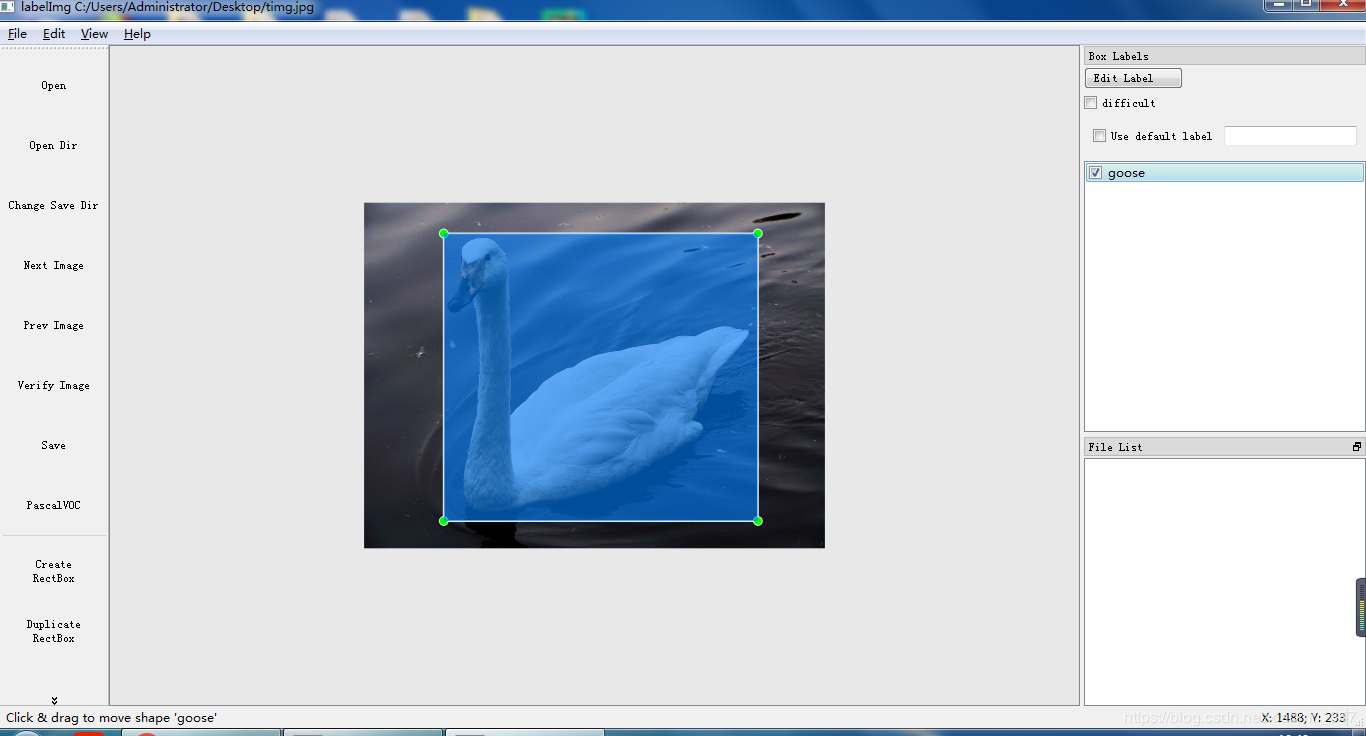
这两款工具简便易行,前者主要用于对目标进行大致的标定,用于常见的框选标定,后者主要用于较为细致的轮廓标定,多用于mask rcnn等。安装也是很方便的,直接在终端下用pip install labelimg即可(至于labelme,需要先安装pyqt,所以先pip install python-qt5,然后再pip install labelme)。其使用界面如下:

labelImg

阅读全文 »

方程求解:

考虑简化的方程:

对方程进行因式分解,

假设:

打开等式右边:

可以得到:

引入一个变化量

变换等式1为如下形式:

假设:

带入等式2可以得到:

打开等式最右边可以得到:

解得:

所以,方程的解为:

.xz

1
2
解包:tar xvf FileName.tar.xz
打包:tar cvf FileName.tar DirName

.tar

1
2
3
 解包:tar xvf FileName.tar
打包:tar cvf FileName.tar DirName
(注:tar是打包,不是压缩!)

.gz

1
2
3
  解压1:gunzip FileName.gz
  解压2:gzip -d FileName.gz
  压缩:gzip FileName
阅读全文 »

Preparing for Gogs on the Raspberry Pi

1. Our first task is to update the packages on our Raspberry Pi. Updating helps prepare our Raspberry Pi for installing and setting up Gogs.

Run the following two commands on your Raspberry Pi to update the package list and packages.

1
2
sudo apt update
sudo apt upgrade

2. With our Raspberry Pi up to date, we can now go ahead and install all the packages that we will be relying on for the Gogs software.

The two packages we are interested in installing is the MariaDB MySQL server and the Git software.

1
sudo apt install mariadb-server git unzip
阅读全文 »

Disabling IPv6

Firstly, check for presence of IPv6 using ifconfig. You should be seeing a few lines containing inet6 addr: ....

To disable, edit a file: sudo nano /etc/sysctl.conf

Add the following line:

Copy

1
net.ipv6.conf.all.disable_ipv6 = 1

For the change to take effect without rebooting:

Copy

1
sudo sysctl -p

Verify that IPv6 address does not show up in ifconfig.

Re-enabling IPv6

If you wish to re-enable, change the value in the setting above from 1 to 0 then execute the following two lines:

Copy

1
2
sudo sysctl -p
sudo ifconfig eth0 down && sudo ifconfig eth0 up

If you are doing this over SSH, the current session will of course be cut off. You should be able to reconnect in just a few seconds.

Extend boot partition of rasperry

  1. Download the Raspbian Lite image, and extract/unzip

  2. Code:

    1
    kpartx -u -v /Downloads/2018-06-27-raspbian-stretch-lite.img

    (Change as appropriate image for image name, and assume that it created loop0, loop0p1 & loop0p2 )

  3. Code:

    1
    fdisk -l /dev/loop0

    Disk /dev/loop0: 1.8 GiB, 1862270976 bytes, 3637248 sectors
    Units: sectors of 1 * 512 = 512 bytes
    Sector size (logical/physical): 512 bytes / 512 bytes
    I/O size (minimum/optimal): 512 bytes / 512 bytes
    Disklabel type: dos
    Disk identifier: 0x4d3ee428

    Device Boot Start End Sectors Size Id Type
    /dev/loop0p1 8192 96663 $88472$ 43.2M c W95 FAT32 (LBA)
    /dev/loop0p2 98304 3637247 $3538944$ 1.7G 83 Linux

    The important part here is the number of sectors for the linux/ext4 partition number 2 ($3538944$ above), will be used in creating partition 2 below.

    阅读全文 »