编程经验分享

笑看嫣红染半山,
逐风万里白云间,
逍遥此身不为客,
天地三才任平凡。

0%

第一部分

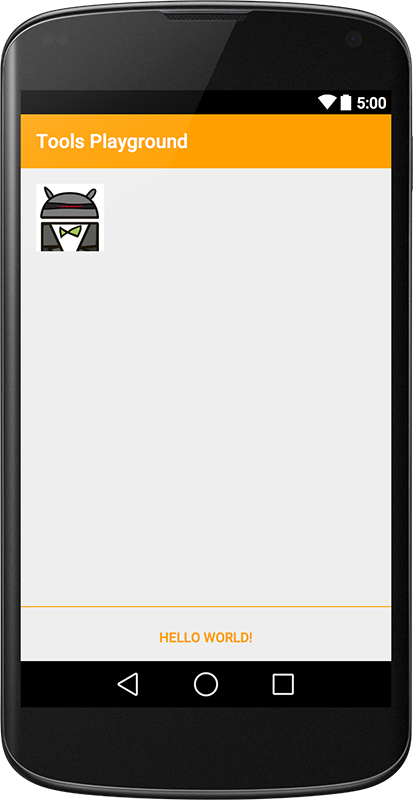
安卓开发中,在写布局代码的时候,ide可以看到布局的预览效果。

但是有些效果则必须在运行之后才能看见,比如这种情况:TextView在xml中没有设置任何字符,而是在activity中设置了text。因此为了在ide中预览效果,你必须在xml中为TextView控件设置android:text属性

<TextView
  android:id="@+id/text_main"
  android:layout_width="match_parent"
  android:layout_height="wrap_content"
  android:textAppearance="@style/TextAppearance.Title"
  android:layout_margin="@dimen/main_margin"
  android:text="I am a title" />

一般我们在这样做的时候都告诉自己,没关系,等写完代码我就把这些东西一并删了。但是你可能会忘,以至于在你的最终产品中也会有这样的代码。

阅读全文 »

1
2
3
4
5
6
7
8
9
10
11
12
<!-- 文字白色阴影style-->
<style name="text_white_shadow">
<item name="android:shadowColor">@color/white</item>
<item name="android:shadowDy">-2</item>
<item name="android:shadowRadius">1</item>
</style>
<!-- 文字黑色阴影style-->
<style name="text_black_shadow">
<item name="android:shadowColor">@color/black</item>
<item name="android:shadowDy">-2</item>
<item name="android:shadowRadius">1</item>
</style>

转自:http://www.jcodecraeer.com/a/anzhuokaifa/androidkaifa/2014/1120/2025.html

Fragment和Activity一样,可以重写onCreateOptionsMenu方法来设定自己的菜单,其实这两个地方使用onCreateOptionsMenu的目的和效果都是完全一样的,但是由于Fragment是从属于activity的,因此第一次使用onCreateOptionsMenu的时候需要注意以下知识点。

阅读全文 »

转自:http://inthecheesefactory.com/blog/fragment-state-saving-best-practices/en

Months ago I published an article related to Fragment State saving & restoring, Probably be the best way (?) to save/restore Android Fragment’s state so far. A lot of valuable feedback are received from Android developers all over the world. Thanks a ton to you all =)

阅读全文 »

关于fragments你所不知道的

复杂的生命周期

Android中,Context是一个上帝对象(god object),而Activity是具有附加生命周期的context。具有生命周期的上帝对象?有点讽刺的意味。Fragments不是上帝对象,但它们为了弥补这一点,实现了及其复杂的生命周期。

阅读全文 »

1. 程序启动图标:

  • LDPI (Low Density Screen,120 DPI),其图标大小为 36 x 36 px。
  • MDPI (Medium Density Screen, 160 DPI),其图标大小为 48 x 48 px。
  • HDPI (High Density Screen, 240 DPI),其图标大小为 72 x 72 px。
  • xhdpi (Extra-high density screen, 320 DPI),其图标大小为 96 x 96 px。
  • xxhdpi(xx-high density screen, 480 DPI),其图标大小为144 x 144 px。
阅读全文 »

转自:http://www.jcodecraeer.com/a/anzhuokaifa/androidkaifa/2015/0305/2535.html

前言

原文:Spans, a Powerful Concept.

最近,我写了一篇关于NewStand app和app上ActionBar的图标的翻转动效的文章。Cyril Mottier建议我采用一个很优雅的方案,即使用Spans去淡入淡出ActionBar的标题。
此外,我一直想尝试所有可用的Sapn色的类型:ImageSpanBackgroundColorSpan等。他们非常简单易用但是(也)没有任何关于它们的文档和详细信息。
因此,在这篇文章中,我将探索在Spans的框架下什么是可以做的,然后,我将会告诉你怎么去进阶使用Spans。

阅读全文 »