如何在CentOS 7上使用Nginx和PHP-FPM 7.1安装Laravel 5.x
如何在CentOS 7上使用Nginx和PHP-FPM 7.1安装Laravel 5.x
在本教程中,我将向您介绍如何在CentOS 7系统上安装带有Nginx Web服务器,PHP-FPM 7.1和MariaDB的Laravel Web Framework。 Larave …
Laravel是一个开源的PHP框架,遵循MVC(Model-View-Controller)设计模式。 Taylor Otwell于2011年创建了该项目,旨在提供CodeIgniter(CI)框架的高级替代方案。 2011年,Laravel项目发布了第1版和第2版,5.4版本已经推出了诸如Command-Line(CLI)命令行模式(artisan)的许多改进,内置了更多数据库类型的支持,并且对路由进行了改进。
本教程将介绍如何在CentOS 7系统上安装带有Nginx ,PHP-FPM 7.1和MariaDB的Laravel Web Framework。 下面将逐步介绍如何在CentOS 7服务器上的LNMP下安装和配置Laravel。
先决条件:
CentOS 7服务器。root权限。
第1步 - 安装EPEL仓库
EPEL仓库是一个额外的软件包仓库,可以提供CentOS官方仓库中没有的软件。 它可以安装在基于RPM的Linux发行版,如CentOS和Fedora。
安装nginx需要用到EPEL仓库,因为CentOS官方仓库中没有nginx软件包。
使用下面的yum命令安装EPEL仓库:
1 | yum -y install epel-release |
EPEL存储库已安装。
第2步 - 安装Nginx
我们将在LNMP下运行Laravel。 Nginx是LNMP的Web服务器,可以从EPEL仓库安装。
使用yum从EPEL仓库安装Nginx 1.10:
1 | yum -y install nginx |
安装完成后,启动Nginx并设置为随操作系统自动启动。
1 | systemctl start nginx |
Nginx在端口$80$上运行,用下面的netstat命令检查:
1 | netstat -plntu |
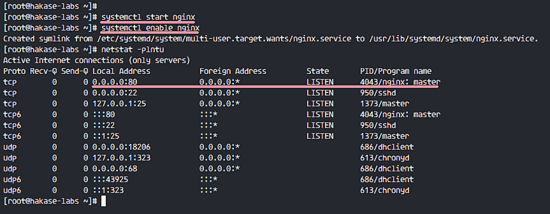
如果出错command not found,请安装net-tools软件包,如下所示:
1 | yum -y install net-tools |
第3步 - 安装和配置PHP-FPM 7.1
Laravel要求PHP版本 > = 5.6.4。我们将使用Laravel支持的最新版本PHP 7.1。
CentOS官方仓库中没有PHP 7.1,我们需要从名为webtatic的第三方仓库安装它。
用下面的rpm命令安装webtatic仓库:
1 | rpm -Uvh https://mirror.webtatic.com/yum/el7/webtatic-release.rpm |
现在,我们可以使用单个yum命令来安装PHP-FPM,其中包含Laravel所需的所有扩展。
1 | yum install -y php71w php71w-curl php71w-common php71w-cli php71w-mysql php71w-mbstring php71w-fpm php71w-xml php71w-pdo php71w-zip |
我们的CentOS 7系统上安装了PHP 7.1。
接下来,使用vim编辑配置文件php.ini来配置PHP。
1 | vim /etc/php.ini |
取消注释下面的行,并将值更改为$0$。
1 | cgi.fix_pathinfo=0 |
:wq保存文件并退出vim。
现在编辑PHP-FPM文件www.conf。
1 | vim /etc/php-fpm.d/www.conf |
PHP-FPM将在用户和组’ nginx ‘下运行,将下面两行的值更改为’ nginx ‘。
1 | user = nginx |
PHP-FPM可以提供套接字文件和tcp两种服务方式,这里我们使用套接字文件方式, 将listen值更改为套接字文件所在路径:/run/php-fpm/php-fpm.sock,如下所示:
1 | listen = /run/php-fpm/php-fpm.sock |
套接字文件所有者是nginx用户,权限模式为$660$,取消注释并更改所有值,如下所示:
1 | listen.owner = nginx |
对于环境变量,取消注释这些行并设置如下所示的值。
1 | env[HOSTNAME] = $HOSTNAME |
保存文件并退出vim,然后启动PHP-FPM并使其随操作系统启动。
1 | systemctl start php-fpm |
PHP-FPM在套接字文件下运行,请使用以下命令检查。
1 | netstat -pl | grep php-fpm.sock |
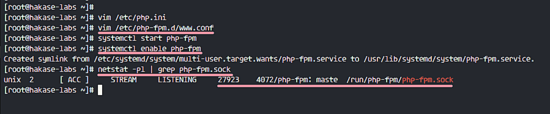
PHP和PHP-FPM 7.1安装和配置已经完成。
第4步 - 安装MariaDB服务器
Laravel支持MySQL和PostgreSQL数据库。 这里使用MariaDB数据库服务器。 可以从在CentOS仓库里安装。 使用下面的yum命令安装MariaDB-server。
1 | yum -y install mariadb mariadb-server |
安装完成后,启动MariaDB并使其随操作系统启动。
1 | systemctl start mariadb |
MariaDB已经启动,并在端口3306上进行监听,可以用netstat命令检查。
1 | netstat -plntu |
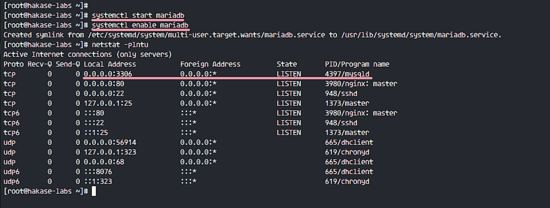
接下来,使用下面的mylsq_secure_installation命令配置MariaDB的root用户密码。
1 | mysql_secure_installation |
输入MariaDB root用户密码,删除匿名用户。
1 | Set root password? [Y/n] Y |
至此,MariaDB的安装和配置已经完成。
第5步 - 安装PHP Composer
PHP Composer是PHP的包管理器,2011年创建。它的灵感来自于Node.js的npm和Ruby的bundle包管理器。 使用curl命令安装Composer。
1 | curl -sS https://getcomposer.org/installer | sudo php -- --install-dir=/usr/bin --filename=composer |
安装完成后,尝试使用composer命令,您将看到以下结果:
1 | composer |
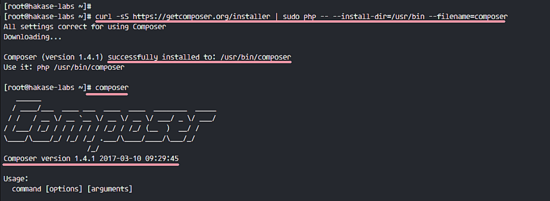
至此,PHP Composer安装在CentOS 7上。
第6步 - 配置Nginx虚拟主机进行Laravel
在此步骤中,我们将为Laravel项目创建nginx虚拟主机配置。
我们需要为这个Laravel项目安装定义web根目录,我将使用var/www/laravel目录作为Web根目录。
使用下面的mkdir命令创建它:
1 | mkdir -p /var/www/laravel |
接下来,转到nginx目录,并在conf.d目录中创建一个新的虚拟主机配置文件laravel.conf。
1 | cd /etc/nginx |
将下面的配置粘贴到文件中:
1 | server { |
:wq!保存文件并退出vim。
测试nginx配置,确保没有错误,然后重新启动nginx服务。
1 | nginx -t |
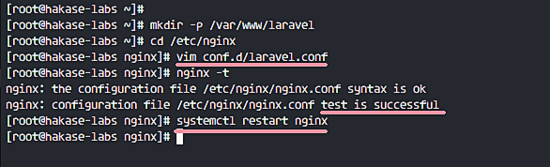
Laravel的nginx虚拟主机配置已经完成。
第7步 - 安装Laravel
在安装Laravel之前,我们需要在服务器上安装解压缩。
1 | yum -y install unzip |
然后进入 laravel web 根目录 /var/www/laravel。
1 | cd /var/www/laravel |
Laravel为服务器上的框架安装提供了两种方式。 可以用Laravel安装程序安装Laravel,也可以用PHP Composer安装。 在本教程中,我将通过使用composer命令创建一个Laravel新项目。
运行下面的命令来安装Laravel。
1 | composer create-project laravel/laravel . |
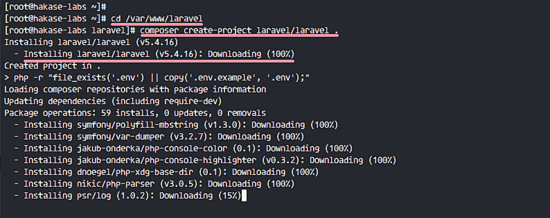
等待Laravel安装完成。 这可能需要一些时间。
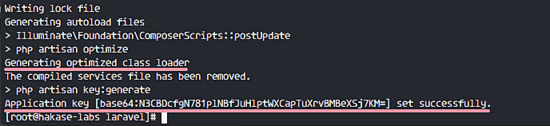
安装完成后,将Laravel Web根目录的所有者更改为nginx用户,并使用以下命令将存储目录的权限更改为$755$。
1 | chown -R nginx:root /var/www/laravel |
Laravel安装已经完成。
第8步 - 配置SELinux
Laravel将运行在SELinux的Enforcing模式下。
要检查SELinux状态,请运行以下命令:
1 | sestatus |
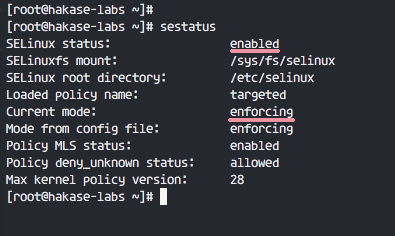
输出表明SELinux正在Enforcing模式下运行。
接下来,我们需要为CentOS 7安装SELinux管理工具。
在服务器上安装policycoreutils-python。
1 | yum -y install policycoreutils-python |
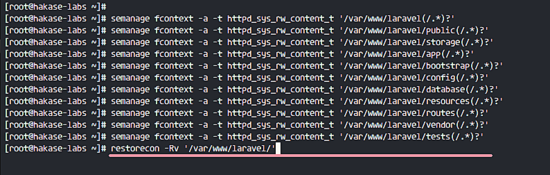
现在我们需要改变Laravel目录的上下文,然后用restorecon命令应用更改。 运行SELinux管理命令,如下所示。
1 | semanage fcontext -a -t httpd_sys_rw_content_t '/var/www/laravel(/.*)?' |
Laravel的SELinux配置完成。
第9步 - 测试Laravel
打开网络浏览器并输入服务器的Laravel URL。 我们已经在Nginx虚拟主机文件中定义了Laravel的域名。 我的是laravel.hakase-labs.co 。
访问域名时,您将看到Laravel主页。
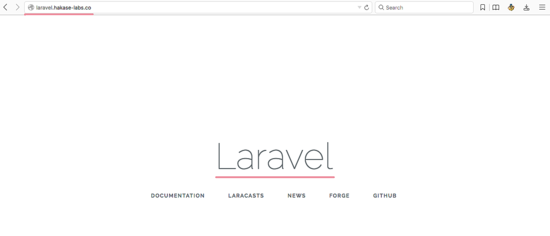
在CentOS 7上使用Nginx,PHP-FPM7和MariaDB的Laravel安装成功。