Python中的格式化输出
常用方式
- 最简单的方式是直接用
print输出变量
1 | q = 459 |
- 也可以先用字符串连接符把所有变量连接成字符串后再输出
1 | print(str(q) + " " + str(p) + " " + str(p * q)) |
显然,第二种方法比第一种方法更差。
传统printf方式
类似C语言中printf函数的格式化方式
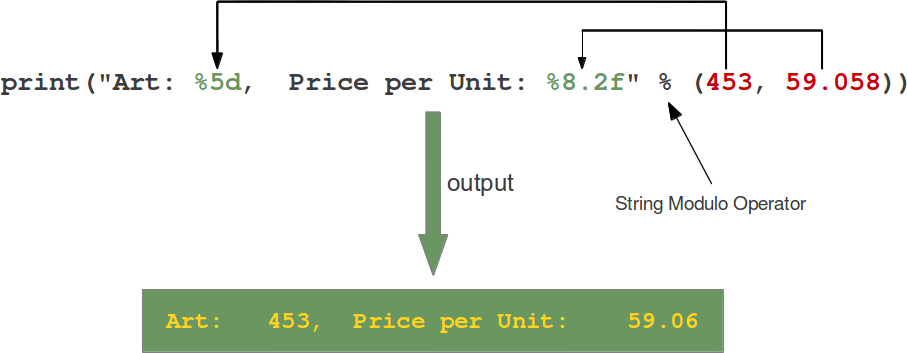
格式化字符串包含了占位符,上面图中两个例子:"%5d"和"%8.2f"。
一般的占位符格式化语法如下:
1 | %[flags][width][.precision]type |
| Conversion | Meaning |
|---|---|
d |
Signed integer decimal. |
i |
Signed integer decimal. |
o |
Unsigned octal. |
u |
Obsolete and equivalent to ‘d’, i.e. signed integer decimal. |
x |
Unsigned hexadecimal (lowercase). |
X |
Unsigned hexadecimal (uppercase). |
e |
Floating point exponential format (lowercase). |
E |
Floating point exponential format (uppercase). |
f |
Floating point decimal format. |
F |
Floating point decimal format. |
g |
Same as “e“ if exponent is greater than -4 or less than precision, “f“ otherwise. |
G |
Same as “E“ if exponent is greater than -4 or less than precision, “F“ otherwise. |
c |
Single character (accepts integer or single character string). |
r |
String (converts any python object using repr()). |
s |
String (converts any python object using str()). |
% |
No argument is converted, results in a “%“ character in the result. |
例子:
1 | print("%10.3e"% (356.08977)) |
| Flag | Meaning |
|---|---|
# |
Used with o, x or X specifiers the value is preceded with 0, 0o, 0O, 0x or 0X respectively. |
0 |
The conversion result will be zero padded for numeric values. |
- |
The converted value is left adjusted |
|
If no sign (minus sign e.g.) is going to be written, a blank space is inserted before the value. |
+ |
A sign character (“+“ or “-“) will precede the conversion (overrides a “space” flag). |
例子:
1 | print("%#5X"% (47)) |
事实上,这种print中的格式化是假的,在使用%操作符(分割格式化字符串和参数的百分号)的时候,Python已经计算出表达式的值了。
可以做个小实验:
1 | s = "Price: $ %8.2f"% (356.08977) |
可以看到,s被赋值,打印s和用格式化打印的方式得到的结果是一样的。
Python方式
使用string的format方法也可以格式化多个参数。
1 | | format(...) |
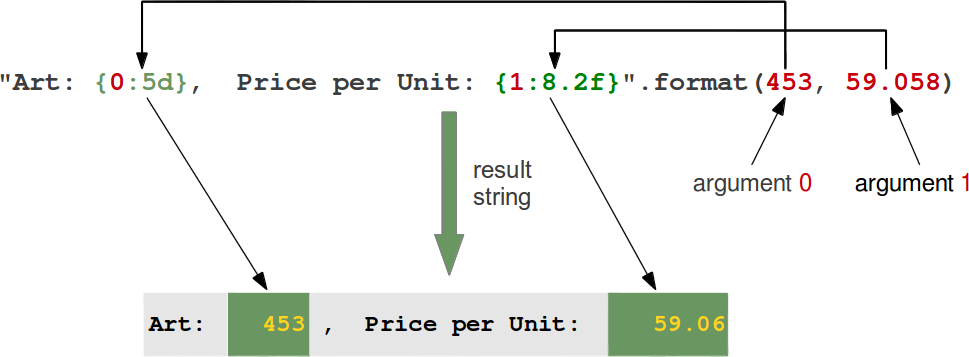
format方法是在2.6版本加入的,一般的使用方式是这样的:
1 | template.format(p0, p1, ..., k0=v0, k1=v1, ...) |
使用方式如下图所示:
例子:
1 | "First argument: {0}, second one: {1}".format(47,11) |
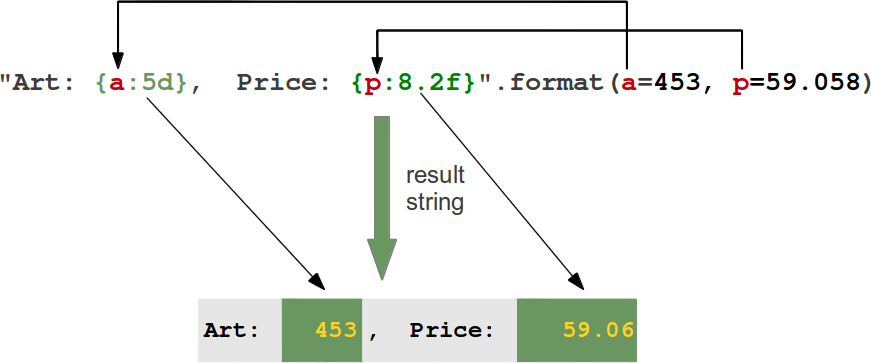
下面这个例子说明了keyword的使用方式:
1 | "Art: {a:5d}, Price: {p:8.2f}".format(a=453, p=59.058) |
如下图所示:
左对齐和右对齐可以用<和>来完成。
1 | "{0:<20s} {1:6.2f}".format('Spam & Eggs:', 6.99) |
| Option | Meaning |
|---|---|
'<' |
The field will be left-aligned within the available space. This is usually the default for strings. |
'>' |
The field will be right-aligned within the available space. This is the default for numbers. |
'0' |
If the width field is preceded by a zero (‘0’) character, sign-aware zero-padding for numeric types will be enabled.>>> x = 378>>> print("The value is {:06d}".format(x))The value is 000378>>> x = -378>>> print("The value is {:06d}".format(x))The value is -00378 |
',' |
This option signals the use of a comma for a thousands separator.>>> print("The value is {:,}".format(x))The value is 78,962,324,245>>> print("The value is {0:6,d}".format(x))The value is 5,897,653,423>>> x = 5897653423.89676>>> print("The value is {0:12,.3f}".format(x))The value is 5,897,653,423.897 |
'=' |
Forces the padding to be placed after the sign (if any) but before the digits. This is used for printing fields in the form “+000000120”. This alignment option is only valid for numeric types. |
'^' |
Forces the field to be centered within the available space. |
除此之外,还可以用符号(sign)选项来修改格式,仅仅适用于数字类型(number)
| Option | Meaning |
|---|---|
'+' |
indicates that a sign should be used for both positive as well as negative numbers. |
'-' |
indicates that a sign should be used only for negative numbers, which is the default behavior. |
| space | indicates that a leading space should be used on positive numbers, and a minus sign on negative numbers. |
在格式化中使用字典
前面提到,有两种方式访问被格式化的参数。
使用位置或者索引
1
2
3print("The capital of {0:s} is {1:s}".format("Ontario","Toronto"))
The capital of Ontario is Toronto使用
keyword参数1
2
3print("The capital of {province} is {capital}".format(province="Ontario",capital="Toronto"))
The capital of Ontario is Toronto
>>>
第二种方式也可以用字典来表示,如下代码:
1 | data = dict(province="Ontario",capital="Toronto") |
双星号(**)自动将data转换成province="Ontario",capital="Toronto"这样的格式。
如下代码:
1 | capital_country = {"United States" : "Washington", |
运行下上面的代码,可以得到下面的结果:
1 | $ python3 country_capitals.py |
可以这样重写一下上面的程序:
1 | capital_country = {"United States" : "Washington", |
其他字符串格式化相关方法
string类还有更多方法可以用于格式化,譬如:ljust, rjust, center 和zfill
假设S 是一个字符串,上述4个方法有如下的定义:
center(…):
1
S.center(width[, fillchar]) -> str
返回值:S居中,长度为
width的字符串,不足部分用fillchar进行填充,默认用空格填充。1
2
3
4
5s = "Python"
s.center(10)
' Python '
s.center(10,"*")
'**Python**'ljust(…):
1
S.ljust(width[, fillchar]) -> str
返回值:S靠左对齐,长度为
width的字符串,不足部分用fillchar进行填充,默认用空格填充。1
2
3
4
5
6s = "Training"
s.ljust(12)
'Training '
s.ljust(12,":")
'Training::::'rjust(…):
1
S.rjust(width[, fillchar]) -> str
返回值:S靠右对齐,长度为
width的字符串,不足部分用fillchar进行填充,默认用空格填充。1
2
3
4
5
6s = "Programming"
s.rjust(15)
' Programming'
s.rjust(15, "~")
'~~~~Programming'zfill(…):
1
S.zfill(width) -> str
返回值:S左侧填充0,长度为width的字符串;S不会被截断。
这个方法可以看做是
rjust的一个特例。1
2
3
4
5
6
7
8account_number = "43447879"
account_number.zfill(12)
'000043447879'
# can be emulated with rjust:
account_number.rjust(12,"0")
'000043447879'