出处:http://stackoverflow.com/questions/26455027/android-api-21-toolbar-padding
How do I get rid of the extra padding in the new Toolbar with Android SDK API version 21 (the support library)?
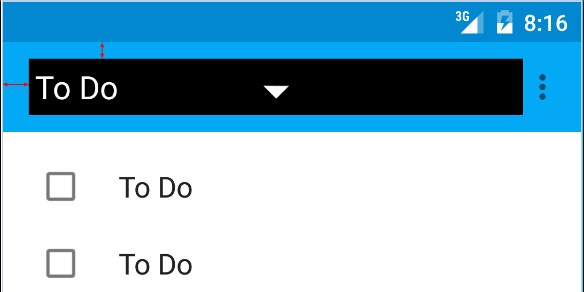
I am talking about the red arrows on this picture:
Here is the code I am using:
1 2 3 4 5 6 7 8 9 10 11 12 13 14 15 16 17 18 19 20 21 22 <android.support.v7.widget.Toolbar android:id ="@+id/toolbar" android:layout_height ="wrap_content" android:layout_width ="match_parent" android:background ="?attr/colorPrimary" android:padding ="0dp" android:layout_margin ="0dp" > <RelativeLayout android:id ="@+id/action_bar_layout" android:layout_width ="match_parent" android:layout_height ="match_parent" android:layout_margin ="0dp" android:padding ="0dp" android:background ="#000000" > <Spinner android:layout_width ="wrap_content" android:layout_height ="wrap_content" /> </RelativeLayout > </Toolbar >
As you can see I’ve set all the relevant padding to 0, but there is still padding around the Spinner. What have I done wrong or what do I need to do to get rid of the extra padding?
Edit Some have questioned why I am trying to do this.
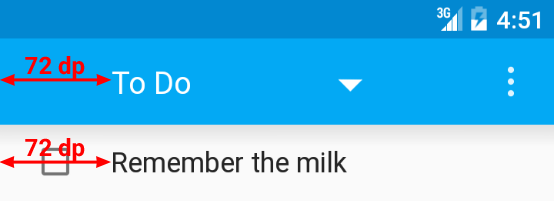
As per the Material Design specs, the spinner should be 72dp from the left side
I need to neutralize the padding Google have put there in order to properly place my spinner:
Edit 2
As per Chris Bane’s answer below I set the contentInsetStart to 0. For the support library you will need to use the app namespace:
1 2 3 4 5 6 7 8 9 10 11 12 13 14 15 16 17 18 19 20 <android.support.v4.widget.DrawerLayout xmlns:android ="http://schemas.android.com/apk/res/android" xmlns:app ="http://schemas.android.com/apk/res-auto" android:layout_width ="match_parent" android:layout_height ="match_parent" > <android.support.v7.widget.Toolbar android:id ="@+id/toolbar" android:layout_height ="wrap_content" android:layout_width ="match_parent" android:minHeight ="@dimen/action_bar_height" android:background ="?attr/colorPrimary" android:contentInsetStart ="0dp" android:contentInsetLeft ="0dp" app:contentInsetLeft ="0dp" app:contentInsetStart ="0dp" app:theme ="@style/ThemeOverlay.AppCompat.Dark.ActionBar" app:popupTheme ="@style/ThemeOverlay.AppCompat.Light" /> </android.support.v4.widget.DrawerLayout >
I hope this helps someone, it had me confused for several days.